Mastering has consistently been a part of music creation that seems shrouded in mystery. Tube-filled boxes seem to breathe new life into tired mixes; subtle shaping to the centre channel allows the sides to ebb and flow. An unbelievable dynamic is present while a limiter crushes a mix to impressive volumes, somehow while retaining clarity and headroom. The rise in popularity of various online audio education makes it easier than ever to demystify, understand and implement a lot of these tricks and techniques into your own music.
Catch up on all the latest reviews here.
The Uni-L Master Limiter, however, seems to retain a bit of this magic. Brought to us by Tone Projects, the Uni-L features everything you need in the final stage of your signal chain. Be it metering, dynamic control, monitoring, clipping and more, the Uni-L is a superbly powerful plugin. Built in collaboration with Bob Macc of Subvert Central Mastering, the Uni-L is a powerful tool with a practical GUI and easy-to-understand parameter controls.
The ‘magic’ comes from the fact that the Uni-L is a wideband limiter with multiband detection, meaning that different areas of your mix are processed differently. This helps you to retain more of the original character of the mix, while reigning in errant areas and augmenting it across the board.
Sound
My own magic moment was simply when I opened an instance of the plugin on my master bus in a recent session. Admittedly, I’d done some shaping and refining before the Uni-L came across my desk, but as the plugin opened, even in default settings, it all came together. My mix was instantly more dynamic, had more punch, and the sources I’d struggled to wrangle together came together. It all sounded more polished, more finished, and frankly, I didn’t feel the need to do much more besides simply slap the plugin on and call it a day. Tone Projects understands this and has a handful of presets available, with a single slider to do more or less of each preset selected. The Uni-L Master Limiter is very powerful with these settings alone. Use these as a simple, effective way to control your mixes and masters, or as a diving-off point for the total control the Uni-L offers. While this preset sold me on the plugin entirely, it wouldn’t make for a very interesting review, so let’s dive in.
The clear, dynamic sound comes from Uni-L’s use of multi-stage limiting and clipping. Slow and Fast limiting work in tandem to clamp down on the bulk of sound with a slow limiter, transients shining through, before the fast limiter gets to work wrangling them into shape.
A clipper at the end shaves off the remaining transient, if needed, while retaining a lot of the dynamic of the original source. The powerful Gain knob allows you to add volume to get music up to a commercial level, without feeling like things are falling apart as you push!
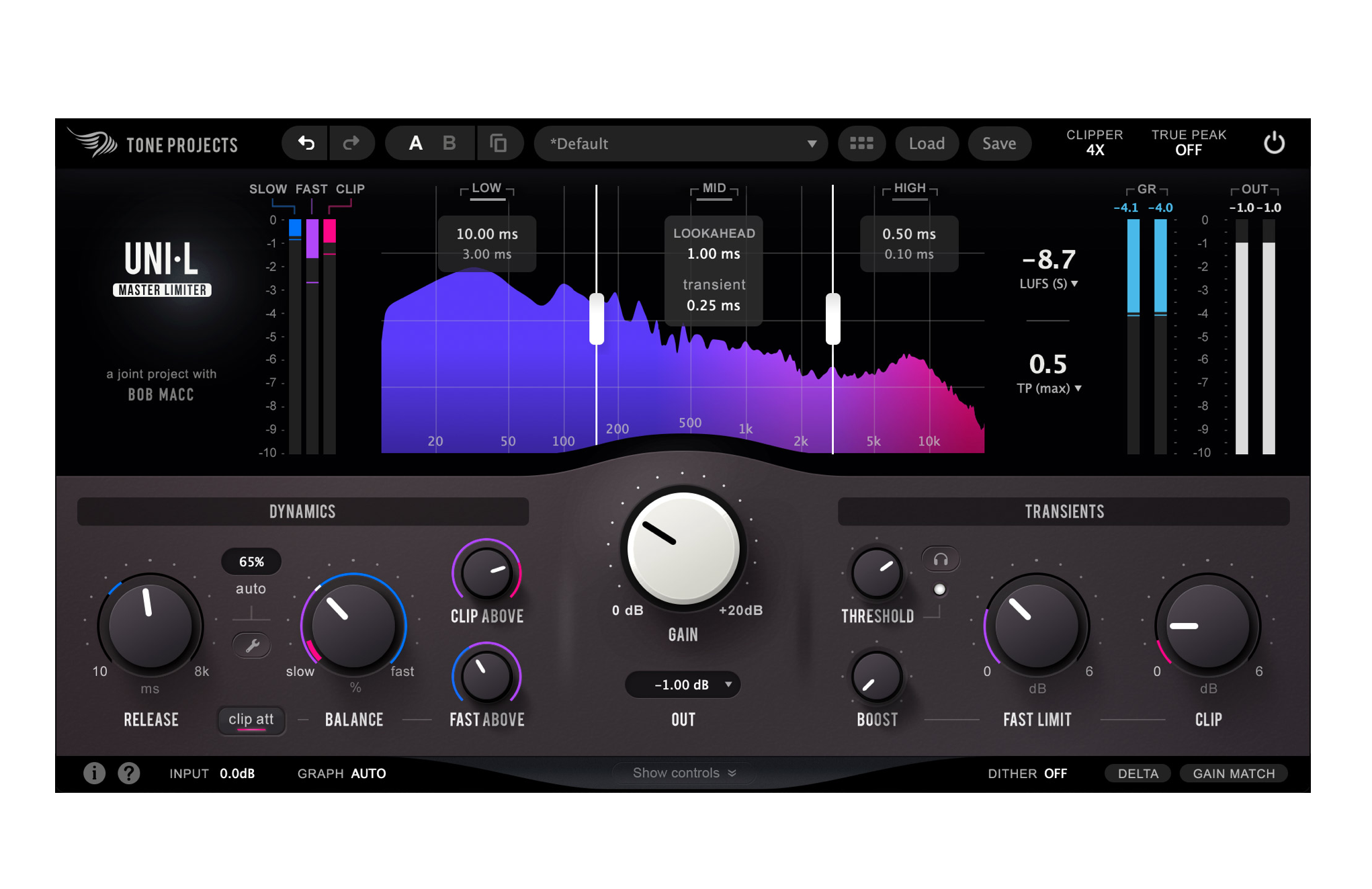
LUFS or True Peak metering communicates your current loudness as you use the plugin. The metering is accompanied by a multi-band frequency response graph, with each band having its own Lookahead controls that we’ll get to in a moment.
The signal begins at the Slow Limiter with an adjustable release time to focus on how much the signal is clamped down. Slower release, of course, tells the Uni-L to stay limiting for longer, which generally results in the signal being limited more consistently.
The Fast limiter comes next, which is where your Lookahead controls in each band come into play. Giving the limiter more time/lookahead to catch transients results in more limiting, so you can refine the amount of fast limiting happening across various bands of sound. There’s an adjustable sweep between these two to control how much of the Slow and Fast limiters are doing the heavy lifting, though admittedly I found myself consistently happy in the middle of both instead of more one or the other. The more the merrier!
The Dynamics section allows you to further refine these, with the big Release control adjusting the release time of the Slow limiter only. You can either use this in manual or auto mode, with the release time changing dynamically.
You can blend in how ‘Auto’ the release time is, allowing you to let the Uni-L take the wheel or do it yourself, or any amount in between. The Balance control, as mentioned earlier, allows you to shift the bulk of the work to either the Slow or Fast limiter.
The Fast Above control sets the crossover of these limiters, i.e. that the fast limiter will only kick in after the Slow Limiter and above 100Hz, for example. This prevents carefully crafted low end being squished into oblivion while trying to tame the high-end!
Following this is the Clip Above control, which serves the same purpose, though this controls where the Clipping comes in after the Fast Limiter. While intended for use as a mastering plugin, this made the Uni-L very handy for tightening and controlling instruments at a bus level, for example, for locking drums into place while retaining dynamic, or multi-band processing on a bass guitar. Great while mixing or stem mastering.
Moving on to the Transient area of the plugin, this serves somewhat like a traditional threshold on a compressor or limiter, but with more tools to fine-tune. The Threshold here controls how much signal needs to be present to trigger the Transient processing.
From there, the Transient Fast Limit and Transient Clip controls decide how that transient energy gets passed along the chain: Transient Fast Limit hands more of the transient over from the Slow limiter to the Fast limiter, while Transient Clip hands transient handling on again, from the limiters to the clipper.
The Boost control emphasises this transient processing across the rest of the Transient settings. It’s a powerful tool for adding life to a mix, but one that can easily be overdone, so tread lightly!
The Transient Detection area of the plugin allows you to further refine how, when and why the limiting kicks in. A handy Filter Type control, with a little visual waveform control, affects the signal the plugin is receiving, allowing you to focus in on problem areas without overly compressing the mix.
Traditional sidechain controls are available with either an HPF or an LPF available, as well as a bandpass and additional HPF with either an additional boost or dip to the sidechain to refine the area receiving processing. Additional ‘Lo Freq’ and ‘Hi Freq’ controls allow you to define the detection circuit even more!
And if this weren’t enough, there’s an additional Transient Detection Context Menu to further hone in on Sensitivity Range, Mid/Side processing, Softness, Hold and Decay times, as well as an additional compression circuit to raise lower-level signal to help the Uni-L handle transients.
The Uni-L plugin has powerful and clear metering available at its core. Pardon the pun, but the dynamic metering (colours, waves and frequency response shifting as you adjust parameters) is really helpful, offering a clear overview of your adjustments as you go.
The frequency response graph is split into low, mid and high frequencies, allowing you to solo each area if and as you wish. The Graph can be toggled into Auto Mode or Peak to see a more or less responsive frequency response. The edges of the bands can be adjusted, extending or narrowing the low end and high end as you go, each of the three bands having the Lookahead and Transient controls that we mentioned earlier.
The metering available in the plugin is a hugely important part of mastering, ensuring you get the best results. The frequency response graph is accompanied by three gain reduction meters: Slow, Fast and Clip that communicate how much signal is being limited or clipped in each area, the meters being blue, purple and pink, respectively. These colours are carried over to the frequency graph, showing you which areas are being affected by fast and slow limiting, or clipped entirely.
The opposite side of the frequency response graph features metering for total Gain Reduction, Output Levels, and two interchangeable numerical meters for various LUFS levels, True Peak monitoring, Look Ahead or Gain Reduction.
Finally, the Uni-L also offers interchangeable Dither types at output, as well as Delta and Gain Match Monitoring. The Delta mode, as its name suggests, allows you to monitor the difference between input and output, i.e. to hear exactly what the Uni-L is doing. The Gain Match Monitoring mode keeps gain at unity and automatically adjusts the output level to match the input to ensure you’re not being tricked by loudness or if you don’t want to risk your gain staging.
Overall, the Uni-L Master Limiter from Tone Projects is as powerful as can be, but as simple as you like. Simply opening the plugin offers a handful of presets controlled by a single slider for more or less processing, while the multitude of controls, dials and toggles allows you to refine the processing happening.
Uni-L is in the business of, first and foremost, retaining every ounce of character and excitement that the input has. This plugin also augments, controls, defines and shapes the resulting sound – with multiple metering options available to ensure levels, gain reduction and final output are perfect for your deliverables. While education has helped us gain insight into the magical world of mastering, the Uni-L brings back a little of that mystery, simply because of how seamlessly it works on everything.
Uni-L is available now for Mac and Windows from toneprojects.com.