Few things are more exciting to a music creator than getting your hands on a new plugin that pushes the boundaries of what you think is possible when it comes to crafting sounds. Have you ever spent hours trying to emphasise a snare sound, wishing that you could process delay on the backbeat separately to the ghost notes, or create a glitchy synth that repeats only the quietest tones? Liminal might just be the key to unlocking your favourite sounds that you haven’t even heard yet.
Created by Sydney-based software company, FlickSwitch Audio, Liminal is a dynamic threshold processor that analyses incoming audio and detects transients before splitting them into three different lanes based on two adjustable thresholds. The first threshold captures high-intensity transients while the second captures medium-intensity transients. Any audio that doesn’t trigger either of the thresholds is classified as the “noise floor” and can be referred to as your quietest lane. Once the categories have been routed to their dedicated lanes, they can then send audio to three effect slots in any combination. This is where the fun and sonic exploration begins.
Catch up on all the latest reviews here.
When I first opened up this plugin, I didn’t really know what to expect, and to be honest, I was a little bit daunted by all the possibilities at my fingertips. Let’s be real, though, I feel like that every time I try a new plugin.
That feeling quickly disappeared once I saw Liminal in action. The layout of this plugin instantly made sense to me, and I was no longer daunted but excited by all the possibilities.
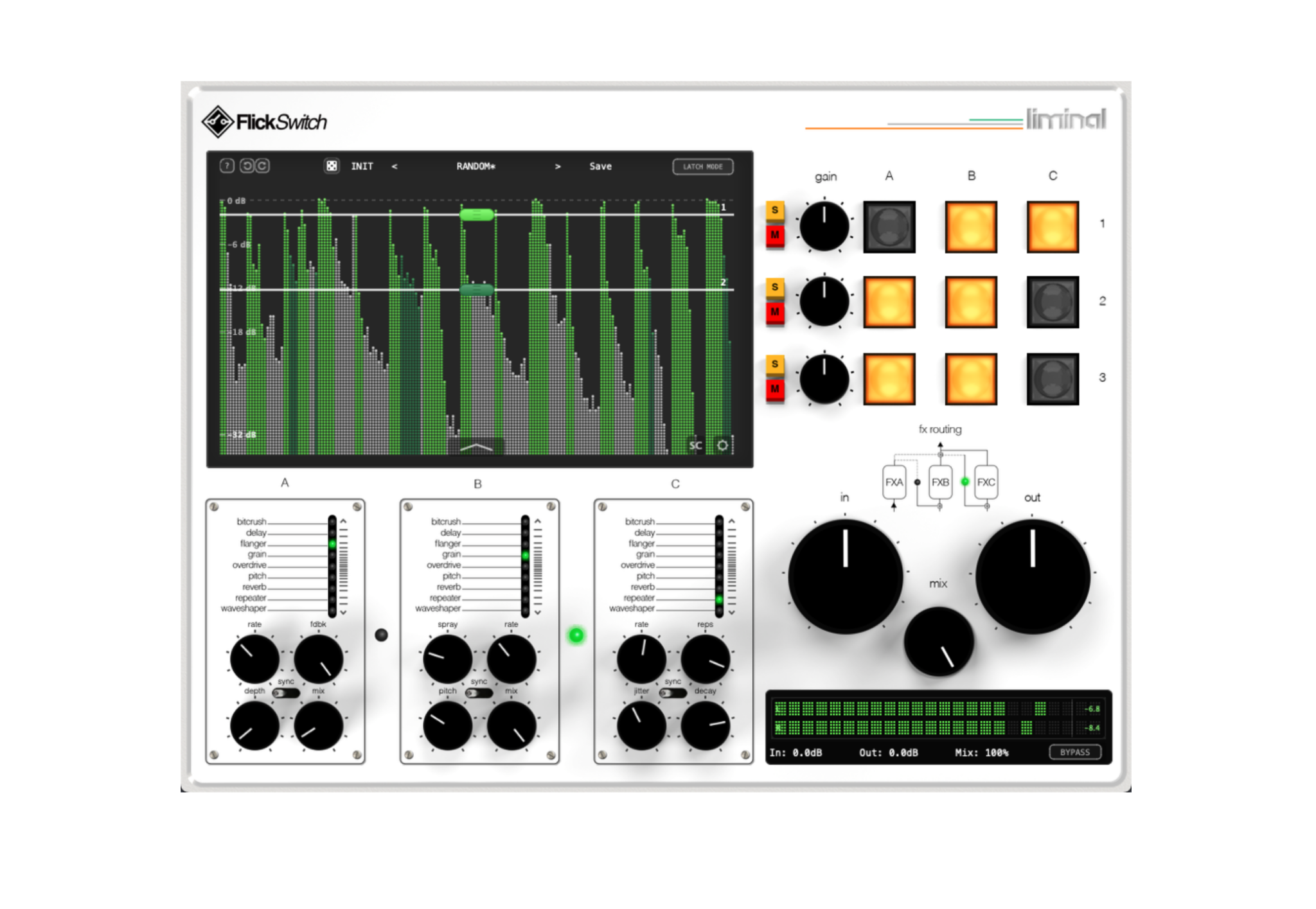
The first thing you see is the real-time scrolling waveform visualiser, which displays the transient detection and allows for interactive threshold adjustment. This visualiser is so well designed and makes it easy to see which parts of the waveform are being captured by the thresholds by showing corresponding colours. The visualiser displays the waveform sections as: light green for lane one (high-intensity transients such as snare cracks or kick attacks), dark green for lane two (medium intensity transients such as ghost notes or lighter hits) and grey/unchanged for lane three (‘noise floor’ or quietest part of the sound). Adjusting the thresholds to your preference is easy, as you get real-time feedback on which parts of your sound are being captured by each threshold as you move it up and down on the visualiser.
A key feature of Liminal is the capability to switch between three transient detection modes, letting the user select a detection algorithm best suited to the source material. This means more accuracy when setting the thresholds.
Users can switch between Percussive mode, Sustained mode and Adaptive mode. Percussive mode is best for drums, percussion, sharp attacks and staccato instruments as it uses fast envelope followers for a more aggressive approach. Sustained mode works well for pads, strings, vocals, piano and sounds with more gradual attacks due to its slower envelope followers, which monitor sustain tails. Adaptive mode continuously analyses the incoming signal and automatically classifies it as percussive or sustained, which makes it well-suited to complex sources such as stems with varied content, full mixes or simply when you’re unsure what mode is going to best suit your source material.
To the right of the visualiser, you have controls for each of the lanes, which include a Gain control alongside Solo and Mute buttons, which mean you can zero in on the sound that you want to capture.
Also, for each of the lanes, you have three buttons titled A, B and C, enabling you to route up to three effects to each lane. There are nine built-in effects which can be assigned to slots A, B and C. These are adjustable from just beneath the visualiser, which include: Bitcrush, Delay, Flanger, Granular Delay, Overdrive, Pitch Shifter, Reverb, Beat Repeater and Waveshaper. Each effect also has its own respective settings, so you can adjust the parameters to suit your sound. I found the layout very intuitive, so I could get straight into experimenting with sounds, without having to spend too long understanding exactly what was happening to the audio I was sending through the plugin.
Further to being able to apply an effect to an individual slot, Liminal offers flexible routing between all the effect slots. The default or parallel mode keeps all three slots to process independently; however, users can utilise the serial modes to feed audio from one effect slot to the next and process the signal again. Serial modes include Serial A→B Mode (slot A feeds into slot B, slot C remains parallel), Serial B→C (slot B feeds into slot C, slot A remains parallel) and Full Serial A→B→C Mode (audio passes through all three effect slots in sequence).
Liminal also comes with a wide range of factory presets alongside presets created by artists Backchat, Jeff Slaugh, Martin Gonzalez, Sean Hubrich, Shizaru and Soek. The presets come with full descriptions and suggestions for how to use them. Not only did I find the presets lots of fun to play around with in my session, I also found them incredibly helpful to understand how to get the best out of Liminal and also how to subtly utilise different settings to open up further possibilities.
I feel like I’ve only just begun to scratch the surface of what you can achieve with this plugin, and I can’t wait to delve deeper. Whether you’re someone who has extensive experience breaking down sounds and putting them back together or you’re completely new to getting surgical in your creations, Liminal is an intuitive tool that helps take a sound source beyond its natural limitations.
Learn more about Liminal and download a free trial here.