Scaler 3, the popular music theory workstation from Scaler Music, is now available for iPad with the full desktop feature set and AUv3 integration.
If you’ve been using Scaler 3 on desktop and hoping it’d make the jump to iOS, you’re in luck.
Scaler Music has launched Scaler 3 for iPad, bringing the full feature set of its music theory workstation. It integrates with iPad DAW apps via AUv3, so it slots into whatever setup you’re already working with, and anything you build on the iPad can be brought straight into Scaler 3 on desktop if you want to take it further.
Catch up on all the latest news here.
For the uninitiated, Scaler 3 is a chord and harmony tool with significant depth. The library covers over 1,000 chord sets, keys and modes sorted by mood, artist and genre — including artist sets from the likes of Carl Cox, MJ Cole and The Temper Trap, across genres from Chill and Drum & Bass to Jazz, Cinematic, Pop and Metal. From there, the software suggests chords based on your current selection and handles voice leading automatically, which makes building smooth progressions much faster than doing it by ear or by hand.
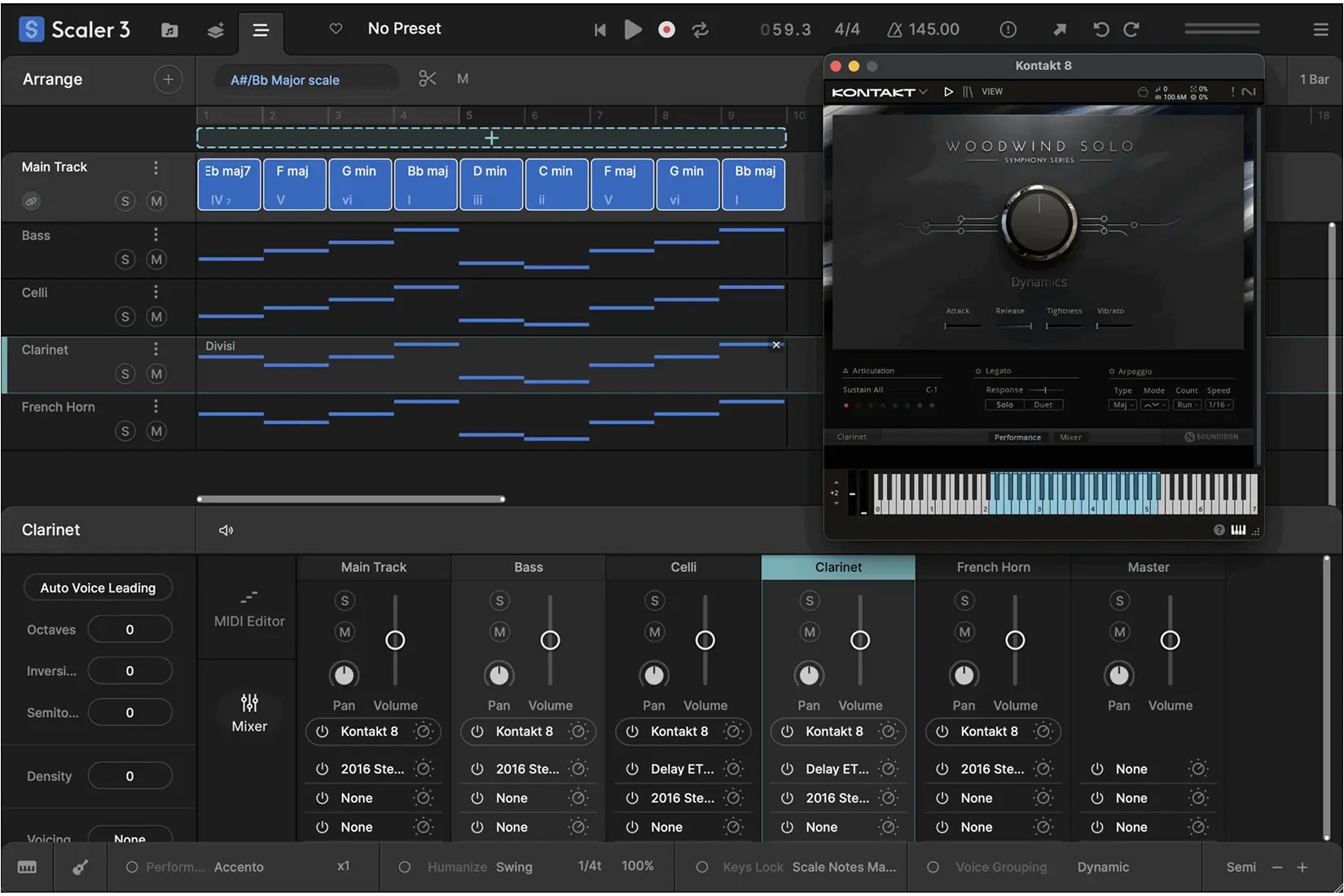
The Arrange Page has a timeline layout with dedicated lanes for chords, melody, bass and phrases, each syncing with the main chord track and adjustable independently. Hand-made by real musicians, the Motions library transforms chord progressions into melodies, arpeggios, basslines and phrases with the original dynamics preserved, and a piano roll editor with modifiers for transposition, density and range allows you to refine things even more.
A few other features worth knowing about are Live Sync, which keeps chord progressions consistent across multiple Scaler instances – particularly useful for Ableton users as Live doesn’t support multi-channel MIDI out. The Bass Follow Track automatically follows the root note of your chord track, and Divisi with advanced voice allocation lets you split chords across multiple instruments for more realistic ensemble writing.
Detection of MIDI and audio means Scaler can identify chords and scales from what you’re already playing and suggest chords that fit — a solid starting point if you’ve got a melody or riff you’re trying to build around. The Circle of Fifths, Modulation Suggestions and Explore Page round out the harmonic toolbox nicely.
It’s worth noting that Scaler 3 for iPad is a separate purchase from the desktop version, available on the Apple App Store.
For more information on Scaler 3, head here.