Melodyne inside Clip View, Multiband and Mid-Side Racks and a micro looper with four playheads: we weigh up what Live 13 brings to the table.
Is that the time? It’s hard to believe a new version of Live has been announced, but here we are, with the full story of what’s coming in Live 13. Let’s dig into the new features and work out whether the update is worth your time.
Catch up on all the latest reviews here.
ARA compatibility
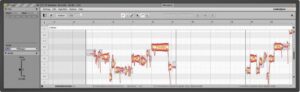
First cab off the rank, Audio Random Access (ARA) plugins are now supported in Live. ARA embeds plugins directly in the Clip View at the bottom of the screen, and if you don’t have any ARA-compatible processors, fret not – Live 13 Suite includes a licence for Melodyne Essential pitch correction. With Melodyne running as an ARA processor, tuning stacks of vocals will be much faster now that real-time capture isn’t needed for each track. Live also supports ARA time-alignment plugins like VocAlign. ARA is a long-overdue inclusion for Live, but notably, not all ARA processors are supported yet. At the time of writing, iZotope RX Editor remains on the to-do list, along with a few other notable exclusions. Hopefully this will be remedied before release, but there’s no news just yet.
Step Sequencer
The Step Sequencer brings with it a new clip type, the Sequencer Clip. You can now add notes and adjust velocity with a single mouse click (yay!), but the real beauty is in the Steps, Rate, Direction and Swing parameters. Each instrument lane can have its own number of steps, each step length can be different, and lanes can cycle through playback directions. Set the hats to play back in both directions and shorten the number of steps, and the world of polyrhythmic potential fast becomes your oyster.
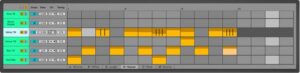
Layers also cover Velocity, timing Offsets for each hit, ratchets (Repeats), Pitch variation in semitones and, through the Chance parameter, the probability of a step being played.
Melodic ideas are easy to enter too, with the available notes defined by Live’s Scale Mode. The control over this new clip type on Push, Ableton’s dedicated controller, is super tight and adds considerably to Push’s groovebox credentials. The Step Sequencer is a fantastic addition with possibilities that words can’t do justice. Trust me bro’, this one’s worth the upgrade on its own.
Audio devices and instruments
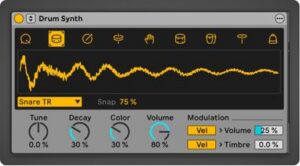
Drum Synth – A multi-drum synth with multiple instruments in one interface. At first I thought it was a re-bundling of existing devices, but Drum Synth appears to be built on different tech. It sounds great and lets you change drum sounds quickly without swapping out plugins or samples.
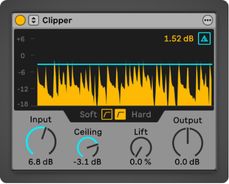
Clipper – Does what it says on the tin: it clips! It also has soft and hard knee shapes, an adjustable threshold and a Lift parameter. Lift is an upward compressor that raises the volume of low-level signals, noticeably increasing average loudness. Clipper sounds equally good on drums or a mix bus, and when carefully tweaked, it can make a mix sound fuller without the squashed artefacts limiters sometimes produce. Time to launch a new campaign in the loudness wars!
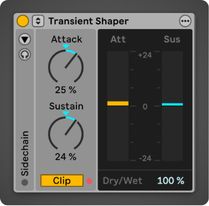
Transient Shaper – Ableton have continued the does-what-it-says naming approach with Transient Shaper, which boosts or cuts the attack and sustain of a sound. Great for shaping drums, plucks, guitars and more, it’s a welcome addition to Live’s palette of effects.
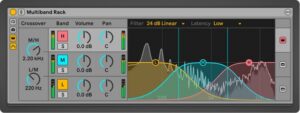
Effect Racks – Two new Rack types arrive. The Multiband Rack offers three bands with switchable crossover slopes and a linear phase option. That opens up multiband distortion and compression, de-essing and frequency-dependent sidechaining, and while the Rack itself has no sidechain input, any device or VST inside it with a sidechain input can still use it. It will be interesting to see the crazy Racks that start to appear.
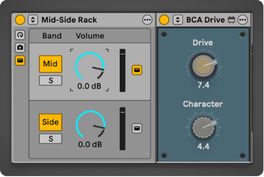
The Mid-Side Rack lets you process the mid (mono) and side (stereo) parts of a signal independently. It’s great if you want to distort the kick and snare in a loop without applying the same processing to the stereo information, or to widen a sound’s stereo image.
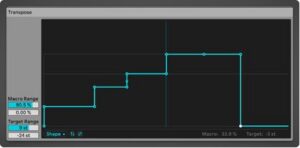
On the subject of Racks, Macros can now be assigned with drag and drop rather than a right-click menu – superb. The Mapping Curve Breakpoint Editor allows custom curves for Macro paths, so a single Macro can be set up as a multi-effects controller that fades between myriad effects options.
Live 13 Suite also includes five Softube effects alongside the native Ableton devices: Neve, 1176 and LA-2A-style compressors, a Neve-modelled EQ and a Neve-modelled Drive device. Each sounds great and brings some analogue vibe you won’t find in Live’s existing Compressor and EQ devices. Of note, the BCA EQ captures the silky top end Neve EQs are famous for. Some users will already have similar tools, but these fit nicely into the new Contextual Browsing approach.
Looplet – This is the kind of device we expect from Ableton. Looplet is a micro looper with four playheads, so different sections of a single sample can be played back in different directions, lengths, rates and pitches. Using the granular parameters, playback speed can also be changed without affecting pitch. It appears to be inspired by the wellspring of boutique guitar pedals that have come to market in recent years – think Hologram Microcosm or Chase Bliss MOOD – and even borrows the retrospective loop capture found on MOOD. Rather than enabling capture and then playing, you play something and then hit capture. Loop length can be set to two, four, eight or 16 seconds, and captured audio is trimmed automatically to fit.
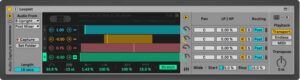
Each loop has its own volume, pan and LPF/HPF filters alongside independent controls for the playback parameters above. In use it’s super fun and yields beautiful results quickly,
and each of the four loops can be routed to separate audio tracks for further processing, which provides almost endless sound design options. Modulation control for the panning, filters and volume would have been nice, but Max for Live tools can fill that gap, so all is not lost.
Push can control almost all of Looplet’s parameters, with the pads selecting the four looped regions, which makes Looplet feel like a hardware pedal in the best possible way. Paired with Push, it holds its own next to the boutique hardware loopers as a peer rather than an imitator.
Capture Automation and Envelope Clips
Much like Capture MIDI, Capture Automation records effect and mixer parameter changes after the fact, with no setup needed beforehand, so moments of inspiration that would be impossible to recreate aren’t lost.
Envelope Clips let you capture, edit and play back complex effects automation on aux channels. Something similar was possible before with complex routing and dummy clips, but this is far cleaner and suits both live performance and studio work.
Push
Live 13 also brings significant updates to Push, Ableton’s dedicated controller (they warrant a separate feature!) Key updates include excellent control of the new Step Sequencer, a performance mixer for launching clips and mixing with the MPE pads (Push 3 only), and custom pad layouts that combine note regions, mixers, Macro controls and control buttons.
The verdict
Live 13 brings a lot to the table. The cost of Melodyne, Looplet and the Softube devices alone could justify the upgrade – they’ve clearly been busy in Berlin. If there’s a wish list for next time, it would include more than 12 return tracks and Linux support.
The absence of AI features is fantastic, in my opinion, and Ableton should be applauded for that alone. While Ableton Extensions, introduced as a beta feature in Live 12.4.5, is now officially supported, it’s interesting to note that Ableton haven’t bundled any with the release.
We live in a golden age of music-making software and hardware, but with that comes the risk of becoming a consumer rather than a producer. Considering everything Ableton have packed into Live 13, it’s hard to argue with the price tag.
For more information, head here